
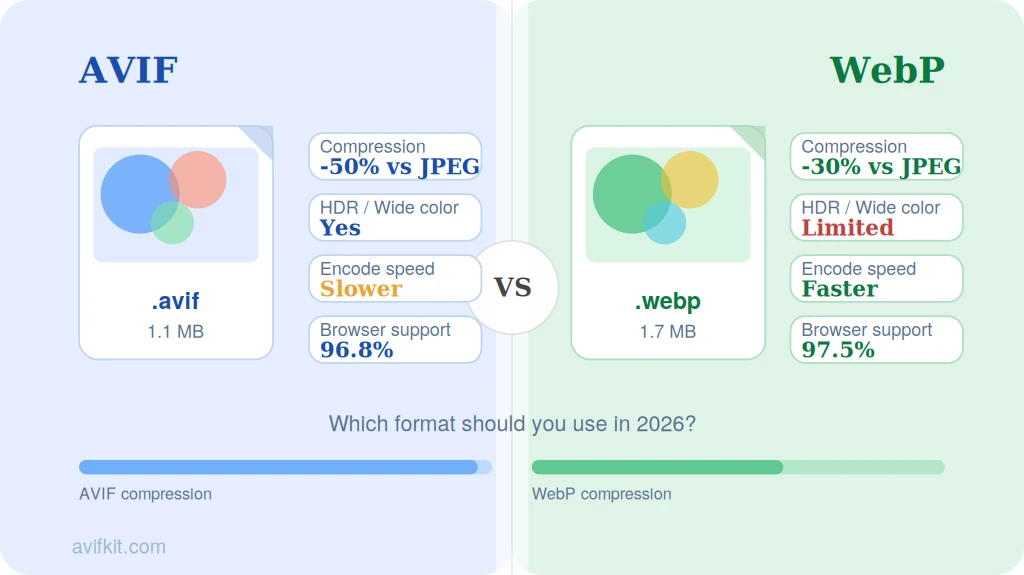
AVIF and WebP are both modern image formats designed to replace JPG and PNG on the web. But which one should you actually use? We tested both formats extensively and compared them across every dimension that matters: compression, quality, speed, and compatibility.
Quick Comparison: AVIF vs WebP at a Glance
| Feature | AVIF | WebP |
|---|---|---|
| Codec | AV1 (AOMedia) | VP8/VP9 (Google) |
| Compression (lossy) | 30-50% smaller than JPG | 25-35% smaller than JPG |
| Compression (lossless) | 20% smaller than PNG | 25% smaller than PNG |
| Max resolution | 8192x4352 per tile | 16383x16383 |
| Color depth | 8, 10, 12-bit | 8-bit only |
| HDR support | Yes | No |
| Transparency | Yes | Yes |
| Animation | Yes | Yes |
| Encoding speed | Slow | Fast |
| Browser support | 95%+ global | 97%+ global |
| License | Royalty-free | Royalty-free |
Compression Quality Comparison
In our testing with a diverse set of 50 photographs, AVIF consistently produced smaller files than WebP at equivalent visual quality. At a target SSIM index of 0.95 (which represents visually indistinguishable quality for most viewers), AVIF files were on average 20-30% smaller than WebP files.
The advantage is most pronounced with photographic content containing complex textures, gradients, and subtle color variations. For simple graphics with flat colors, the difference between AVIF and WebP narrows significantly.
Where AVIF particularly excels is at very low bitrates. When you need to aggressively compress images for mobile users or slow connections, AVIF maintains better visual quality than WebP. This makes it especially valuable for thumbnail images and social media previews where every kilobyte counts.
Encoding and Decoding Speed
This is where WebP has a clear advantage. WebP encoding is roughly 5-10x faster than AVIF encoding at comparable quality settings. If you're converting images in real-time or processing large batches on a server, this speed difference matters.
Decoding speed (displaying the image) is more comparable between the two formats. Both decode quickly enough that the difference is imperceptible in normal browsing. However, AVIF decoding is slightly slower, which can matter on very low-powered devices.
For pre-processed images (build-time optimization for websites), encoding speed is less important because you encode once and serve many times. For user-uploaded content that needs real-time conversion, WebP's faster encoding may be preferable.
Browser and Software Support
WebP has been around since 2010 and has had more time to gain adoption. It's supported by all major browsers and most image processing libraries. AVIF, released in 2019, is catching up quickly but still has gaps in some older browsers and software.
| Browser | WebP Support | AVIF Support |
|---|---|---|
| Chrome | Version 32+ (2014) | Version 85+ (2020) |
| Firefox | Version 65+ (2019) | Version 93+ (2021) |
| Safari | Version 14+ (2020) | Version 16.4+ (2023) |
| Edge | Version 18+ (2018) | Version 121+ (2024) |
| Global coverage | ~97% | ~95% |
For software support, WebP is more widely adopted. Photoshop, Figma, Sketch, and most CMS platforms support WebP natively. AVIF support in design tools is still emerging, though it's improving rapidly.
Color Depth and HDR
AVIF supports 10-bit and 12-bit color depth, which means it can represent over 1 billion colors compared to WebP's 16.7 million (8-bit). This makes AVIF the clear choice for HDR photography, professional color work, and content targeting HDR displays.
If you're working with standard web content viewed on typical monitors, this difference won't matter much. But if you're serving images to HDR-capable devices (iPhone 15 Pro, HDR monitors, Apple ProMotion displays), AVIF's HDR support provides a genuine quality advantage.
Which Format Should You Choose?
Choose AVIF when:
- Maximum compression is critical (e.g., image-heavy websites, mobile apps)
- You need HDR or wide color gamut support
- You can pre-process images at build time (encoding speed doesn't matter)
- Your target audience uses modern browsers
Choose WebP when:
- You need faster encoding for real-time conversion
- Maximum browser/software compatibility is required
- You're working with lossless images (WebP lossless is competitive with AVIF)
- Your images are primarily simple graphics rather than photographs
Use both with fallbacks:
The best strategy for most websites is to serve AVIF to browsers that support it and fall back to WebP (or JPG) for others. The HTML 'picture' element makes this easy. This approach gives you the best compression for most users while maintaining universal compatibility.
Format conversion tip:
Need to convert between AVIF and WebP? Use Avifkit's free converter - it handles both directions (AVIF to WebP and WebP to AVIF) entirely in your browser.
Convert Between AVIF and WebP
Free online converter for AVIF and WebP. No upload, no registration, instant results.
Convert AVIF to WebP